For buyers seeking effortless light control and privacy, remote-controlled blinds offer convenient motorized operation without drilling. This guide highlights five top options designed for inside mounting, cordless use, and simple remote or smart-home integration. Best for renters, small spaces, bedrooms, and home offices, these picks balance ease of installation with reliable shading performance. The following table provides a quick snapshot of each product’s standout feature.
| Product | Brand | Key Benefit |
|---|---|---|
| Motorized Blinds No Drill Automatic Blinds for Windows Cordless Roller Shades Electric Blinds with Remote Control Smart Blinds (White, 34.5 x 72) | Hapadif | No-drill, app/voice control ready via hub |
| LICHTDIM24 No-Drill Motorized Blinds with Remote Control | LICHTDIM24 | Upgraded blackout fabric, rechargeable, solar charging |
| SwitchBot Blind Tilt Motorized Blinds | SwitchBot | Easy retrofitting with tilt-only operation, solar-powered |
| Motorized Blinds No Drill Automatic Blinds for Windows Cordless Roller Shades Electric Blinds with Remote Control Smart Blinds (White, 22 x 72) | Hapadif | Compact size with same no-drill setup |
| No Drill Motorized Blinds with Remote, Solar Panel | MUSCLEAREA | Solar-powered, can control one shade on remote; scalable with hub |
Motorized Blinds No Drill Automatic Blinds (34.5 x 72)

Best for large windows in living rooms or home offices that require full blackout and remote control. This Hapadif model uses a 3-layer blackout fabric for UV protection and privacy. It’s designed for inside mounting with a no-drill mechanism and a top battery compartment for easy power changes. The included valance helps seal the top gap for better shading. A smart bridge is required for app or voice control via Alexa or Google Assistant, making it a strong choice for users planning a smart-home setup. Caution: installation relies on the adhesive extension block; mounting accuracy is important for optimal operation.
LICHTDIM24 No-Drill Motorized Blinds
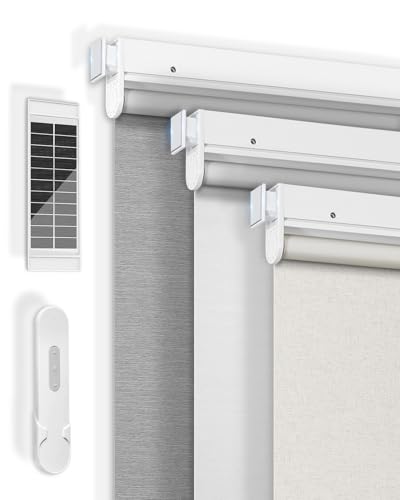
Best for renters and safety-conscious homes, this model emphasizes easy no-drill installation with a cordless design and 100% blackout fabric. The upgraded 26-layer blackout material provides better UV and privacy protection. It includes rechargeable operation with the option of solar charging, reducing the need for frequent battery changes. It’s a solid pick for rooms that demand a quiet, dark environment, such as bedrooms or media rooms. Limitation: battery life can vary with use; frequent openings may require more frequent charging and recharging.
SwitchBot Blind Tilt Motorized Blinds

Best for upgrading existing horizontal blinds with a tilt rod, SwitchBot Tilt focuses on precise tilt control and continuous solar charging. The built-in 2000mAh battery and solar panel enable long-term, maintenance-free operation. It includes a light sensor to adjust light levels automatically, helping maintain consistent ambiance. Choose this if you want to retrofit without replacing blinds. Caution: not compatible with vertical blinds, roller shades, or roller blinds that lack a tilt rod.
Motorized Blinds No Drill Automatic Blinds (22 x 72)

Best for smaller windows or rooms with limited wall space, this Hapadif model mirrors the no-drill installation and 3-layer blackout fabric for privacy and UV protection. It supports app/voice control via a hub and is suitable for bedrooms, living rooms, and offices needing easy remote operation. Limitation: smaller size means it may not cover very wide windows; check dimensions before purchase for proper fit.
No Drill Motorized Blinds with Remote and Solar Panel

Best for users who want solar-powered shading with remote control and optional smart hub integration, this MUSCLEAREA model is designed for easy installation and ongoing power efficiency. The solar panel reduces battery replacements, and the remote offers direct control for a single shade, with potential expansion to multiple shades if paired with a compatible hub. A limitation to consider is that the 15-channel remote (not included) is needed to control up to 15 shades at once, so plan for a larger install if needed.
Buying Guide: Key Purchase Considerations
- No-drill blinds are ideal for renters and surfaces you don’t want to damage. Ensure your window frame can accommodate adhesive blocks or mounting hardware as described by the product.
- Look for blackout fabrics for complete darkness and privacy, or lighter textures for daylight still allowing some glow. Higher-layer fabrics improve UV protection and insulation.
- Cordless models rely on batteries or rechargeable builds; solar-powered options reduce maintenance. Check expected battery life and charging requirements.
- If you have Alexa, Google Home, or other hubs, confirm compatibility and whether a hub is required for voice control and scheduling.
- Some models are safer for homes with children and pets due to cordless operation. Assess whether your space benefits from a leveling sensor or light-sensing control.
- Tilt-only SwitchBot models offer retrofitting for existing blinds but aren’t universal. Ensure your blinds’ design is compatible with the motorized mechanism.
Frequently Asked Questions
- Do I need to drill holes to install remote blinds? Not necessarily. Several models use no-drill installation with adhesive blocks or mounting rails, which is ideal for renters or non-permanent setups.
- Can remote blinds integrate with smart home hubs? Yes. Most units support Alexa or Google Assistant via a home hub, enabling voice control and routines.
- How long do battery-powered blinds last between charges? Battery life varies by usage and model; some recharge via solar or have replaceable batteries, with several months between charges under typical use.
- Are blackout shades better for bedrooms? Yes, blackout fabrics reduce light and improve privacy, making them optimal for bedrooms and media rooms.
- Can I retrofit existing blinds with motorized controls? Some models, like tilt-enabled systems, are designed for retrofit, while others require replacement of the entire shade mechanism.
- What should I consider for window size compatibility? Always verify the blind dimensions (width x height) match your window opening, especially for smaller or narrow panes.