Discover ergonomic and space-saving helpers to free desk space with under-desk keyboard drawers and trays. This guide highlights five top options, detailing their layouts, adjustability, and best-use scenarios to help you pick the right fit for home, office, or student setups.
| Product | Brand | Key Benefit | Ideal For |
|---|---|---|---|
| Fellowes Office Suites Underdesk Keyboard Drawer | Fellowes | 3 height adjustments | |
| HUANUO Keyboard Tray Under Desk | HUANUO | 360° motion with 6⅓” height range | |
| VIVO Extra Long Clamp-on Tray | VIVO | Long platform with up to 11 lbs capacity | |
| Kensington Keyboard Tray Under Desk | Kensington | SmartFit height adjustment | |
| AX WABER Keyboard Tray Under Desk | AX WABER | Sturdy C-clamps for secure mounting |
Fellowes Office Suites Underdesk Keyboard Drawer

The Fellowes model offers a height-adjustable unit with three position options to match individual seating or standing heights. It helps free desktop space by moving the keyboard and mouse off the main surface, and includes a versatile mouse tray that can mount on either side or tuck away beneath the keyboard tray. The tray itself is sturdy and designed to fit standard keyboards, making it a solid choice for compact workstations that need reliable ergonomics and simple adjustment.
HUANUO Keyboard Tray Under Desk

The HUANUO tray emphasizes a wide, full-size platform measuring 25″ by 9.84″, accommodating keyboards, mice, and extra desk items. It features a full-motion design with 180° swivel, plus tilt adjustments for improved comfort. Height adjustability spans 6.3 inches, enabling sit-stand ergonomics. A wrist rest is included to bolster wrist support, and the tray folds to support both seated and standing work rhythms, making it suitable for multi-user and variable-height environments.
VIVO Extra Long Clamp-on Keyboard Tray

The VIVO MOUNT-KB15EB tray offers a notably long platform at 33.9″ (39.4″ including clamps) by 11″, supporting keyboards, mice, and small accessories with up to 11 lbs capacity. It extends up to 8.5″ from the desk edge, and its clamp-based mounting does not sit on top of the desk. Before purchasing, verify desk thickness and available clamp space to ensure compatibility with your workstation layout.
Kensington Keyboard Tray Under Desk
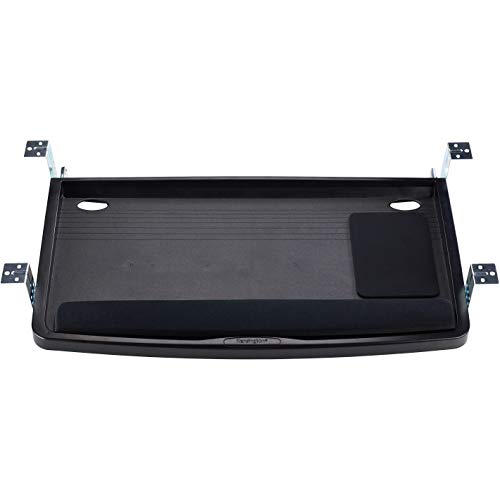
The Kensington K60004US model uses SmartFit color-coded height adjustments to set the keyboard at an optimal height quickly. Its extra-wide 24.5″ x 11.75″ tray is designed to accommodate large keyboards and includes space for a wrist rest, mouse, and mouse pad alongside the keyboard. This configuration supports ergonomic alignment while maximizing usable tray real estate for extended typing sessions.
Klearlook Upgraded Adjustable Keyboard Tray

The Klearlook tray provides dual installation options for above-desk and under-desk use, with 360° horizontal rotation and notable vertical arm adjustments. It includes a wrist rest, a storage drawer, and a phone slot, along with a headphone hanger, creating a compact, all-in-one workspace organizer. Its versatility makes it suitable for both standard desk setups and more dynamic gaming or streaming stations.
VIVO Large Keyboard Tray With Pencil Drawer

This VIVO model pairs a broad 26.8″ x 11″ under-desk tray with a 17″ pencil drawer. It emphasizes ergonomic typing and includes a clamp-based mounting system for desk compatibility. The drawer provides additional storage for pens, small tools, or office supplies, keeping the main workspace clear while maintaining quick access to essentials during work or study sessions. The combined length from clamp to clamp is 32.5″, so desk depth and clamp space are important checks before purchase.
TECLUK Keyboard Tray Under Desk With Drawer

The TECLUK model emphasizes a combined keyboard tray and built-in drawer to maximize space efficiency. A 26.77″ x 11.81″ large tray fits full-size keyboards, with a C-clamp mounting system for secure installation. The design highlights a balance of space-saving and practical storage, suitable for home offices or compact work areas where organization is essential.
AX WABER Keyboard Tray Under Desk

The AX WABER tray uses a sturdy C-clamp mounting system to secure the tray and support a 32.5″ total clamp-to-clamp length. The sliding platform measures 27.3″ deep, extending up to 5.7″ from the desk edge for comfortable typing angles while preventing desk clutter. It is designed to fit desks within the specified thickness limits and provides reliable support for busy workstations.
Buying Guide
Key considerations when choosing a keyboard drawer or tray include desk compatibility, mounting method, and ergonomic adjustability. Clamp-on options are ideal for desks that can bear clamps without damage, while under-desk trays with integrated drawers maximize storage for smaller accessories. Important dimensions include platform width and depth to ensure fits for large keyboards and a safe extension range to avoid wrist strain. Height adjustability matters for sit-stand routines and personal comfort. For shared workspaces, look for models with versatile left/right mouse tray mounting and easy depth clearance to accommodate monitor placement. Material durability and weight capacity affect long-term reliability, especially in high-use environments. Finally, verify installation requirements—some desks must meet specific thickness thresholds or space between clamps to provide secure mounting. Compare overall space savings, ease of installation, and ergonomic features to determine the best fit for your workflow.