Answer: A bedside charging station with built-in outlets and USB ports is ideal for tech-heavy bedrooms, nightstands that want clutter-free cords, and desks that double as charging hubs. The top picks below cater to different needs—from compact nightstands with integrated USBs to larger end tables with multiple outlets. Best for busy households, small spaces, and users who want ready-to-use charging without extra power strips.
Buying at a glance: the following table helps compare core offers at a glance.
| Product | Best For | Key Benefit | Notable Limitation |
|---|---|---|---|
| VHBW 6-Port USB Station | Multiple devices, balanced USB mix | 3 USB-C + 3 USB-A ports for six devices | USB-C ports are for standard charging, not fast charging |
| HOOBRO Side Table with Charging | Small spaces, storage + power | Two open shelves plus USB/AC outlets | Long cord may require placement planning |
| Fixwal LED Nightstand | Mood lighting + storage | LED RGB lighting with fabric drawers | Data on charging speed is not specified |
| SUPERJARE Nightstand with Charger | Bedroom organization | 1 USB, 2 outlets, 1 Type-C with drawer | Fabric drawer assembly may vary by unit |
| Huuger Nightstand with USB/Outlets | Tall bedside reach, ample storage | 2 AC outlets, USB, Type-C with fabric drawers | Single configuration; check space fit |
VHBW USB Charging Station—6 Ports with Phone Stand

The VHBW charging station provides six USB ports: three USB-A and three USB-C, plus a built-in phone stand. It supports input 100V-240V and outputs 5V 3A 15W, enabling simultaneous charging for multiple devices—ideal for a bed table where several people share devices. Best for households with mixed device types (phones, tablets, wearables). A limitation is that the USB-C ports are for standard charging, not fast charging, so users needing rapid recharges should consider alternatives with higher wattage on USB-C ports.
Anker Desktop Charger—9-in-1 Power Strip

Anker’s 9-in-1 charger combines three AC outlets with four USB-C ports and two USB-A ports, offering up to 100W per USB-C port when used individually. It’s a strong choice for a larger desk or a shared nightstand where devices demand more power. It features an 8-point safety system designed to protect devices from overvoltage and short circuits. Best for users who need robust, centralized power for numerous USB-C devices. A potential drawback is its larger footprint, which may be less suitable for very compact nightstands.
HOOBRO Side Table With Charging Station

HOOBRO’s compact end table integrates a 3-prong AC outlet, a USB port, and a Type-C port on a slender frame. It features two open shelves for storage, and its dimensions (15″ L x 11″ W x 21.7″ H) fit small rooms well. Best for compact bedrooms or living spaces where you need a simple, unobtrusive charging surface with extra storage. A caution: the long 4.9-foot power cord requires planning for cable routing to avoid clutter.
Fixwal Night Stand With Charging Station
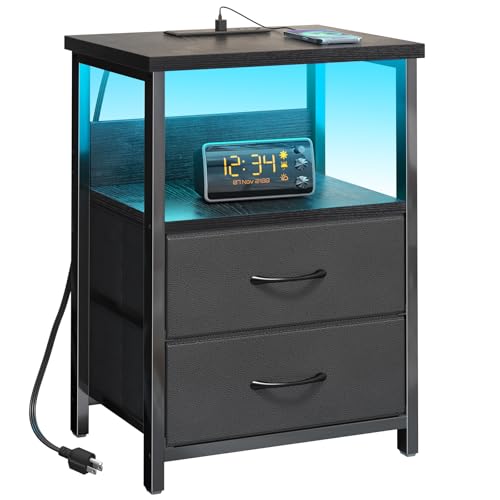
Fixwal’s LED nightstand combines two outlets with USB ports, plus RGB lighting that can adapt to rooms’ moods. Its two fabric drawers and a storage shelf provide versatile organization. Best for bedrooms seeking ambience with practical charging. The LEDs are a design feature, not a charging speed claim, so users prioritizing ultra-fast charging should cross-check port wattage in product details.
Furologee End Table With Charging Station

Furologee’s white nightstand includes two outlets and two USB ports with a 4.9-foot power cord, plus two fabric drawers for storage. A practical choice for bedrooms that want clean lines and hidden storage. The backboard socket placement helps reduce spill risk, though overall charging speed details aren’t specified in the listing.
Buying Guide: Key Considerations for a Bedside Charging Station
- Power needs: Assess how many devices you intend to charge at once. If you frequently charge multiple phones, tablets, and accessories, look for 6+ ports and a mix of USB-A and USB-C ports.
- Outlets vs. USB ports: Decide whether you need traditional AC outlets in addition to USB charging. Some tables provide both, which reduces the need for extra power strips.
- Space and layout: Measure your bedside area. If space is tight, consider slim profiles with integrated storage to keep essentials organized.
- Cable management: Favor designs with cord routing options or built-in cable clips to minimize clutter and maintain a neat surface.
- Charging speed: For USB-C, wattage matters. If fast charging is essential, verify the wattage per port (some models offer up to 100W total or per port when used in isolation).
- Safety features: Look for surge protection, overcurrent protection, and a design that discourages moisture exposure around desks and nightstands.
- Ambience and aesthetics: If you value mood lighting or a specific finish, select a model that complements your room decor while still meeting power needs.
Frequently Asked Questions
- What is the main advantage of a bedside charging station?
It consolidates power, reduces clutter, and provides accessible charging right beside your bed. - Should I choose USB-C or USB-A ports for a nightstand?
USB-C ports support newer devices and higher power in many cases, but USB-A remains widely compatible. A mix is common. - Is a built-in outlet better than separate power strips?
Built-in outlets reduce cable mess and help prevent overloading when used with a dedicated nightstand setup. - How important is cable management on a bedside table?
Very important for safety and aesthetics; organized cords prevent trips and tangles near the bed. - Can LED nightstands interfere with sleep?
Some users prefer dimmable or color-adjustable LEDs; choose models with low-glare, warm lighting if light exposure is a concern. - What should I check before buying?
Verify port wattage, total power rating, cord length, and whether the unit includes a warranty or safety certifications.