Looking for door openers that reduce physical strain, boost safety, and support accessibility? This guide highlights top accessible automatic door openers tailored for individuals with mobility challenges, caregivers, and facilities aiming for ADA-compliant access. Each option supports either manual or automatic operation, features safety re-opening, and offers smart controls or wireless push buttons. The picks below are best for: home or small business users needing reliable automatic opening, facilities seeking remote access, and seniors or wheelchair users prioritizing hands-free operation.
Summary of selected products
| Product | Brand | Best For | Door Type | |
|---|---|---|---|---|
| Handicap Door Opener with Stainless Push Buttons | Olideauto | Seniors and wheelchair users needing low-energy operation | Manual/automatic modes, adjustable closing force, safety auto-reopen, WiFi voice control | Swing |
| Olideauto Olide-120B With Wireless Push Button | Olideauto | Commercial or high-traffic access requiring WiFi control | Smart WiFi, voice control, auto re-open, wireless/wired modes | Swing |
| Automatic Dual Door Opener | Olideauto | Two-door systems needing synchronized operation | Operate 2 swings with one button, easy programming, safety reopen | Swing (dual) |
| Touchless Commercial Door Opener | Olideauto | Touchless entry for high-traffic or hygiene-focused spaces | 2x 304 stainless touchless sensors, manual override, auto reopen | Swing |
| Smart WiFi APP Control Automatic Door Opener | Olideauto | Smart homes or offices needing voice and app control | WiFi app control, Alexa/Google Assistant, adjustable parameters | Swing |
Handicap Door Opener With Stainless Push Buttons

Best for users who need low-energy operation and simple manual override. This model supports both manual push and automatic opening, with adjustable closing force via handheld programmer. It includes a safety feature that reopens if an object is detected in the closing path and offers smart home compatibility through WiFi for voice control with Alexa or Google Assistant. Best for residences or small facilities where voice control adds convenience, and where users may prefer a straightforward push-button option. Caution: Manual push force adjustments require access to the handheld programmer.
Olideauto Olide-120B With Wireless Push Button

Best for commercial or multi-user settings needing remote control from anywhere. The Olide-120B supports smart WiFi connectivity, voice control via Alexa or Google Assistant, and a safe auto-reopen function. It includes compatibility notes about knob lock behavior affecting manual operation, making it suitable for controlled access environments. Choose this if you want integrated smart home control and remote management. Limitation: Some configurations require understanding door lock behavior to avoid unexpected manual operation restrictions.
Automatic Dual Door Opener

Best for facilities needing two doors to open in unison with a single control. This system enables one handheld programmer to adjust both units individually, with wireless and wired options for push buttons. It includes auto-reopen for safety and simplified setup. It is ideal for storefront entrances or clinics where synchronized operation with minimal manual effort matters. Caution: Ensure door frames support dual units and adequate space for installation.
Smart WiFi APP Control Automatic Door Opener
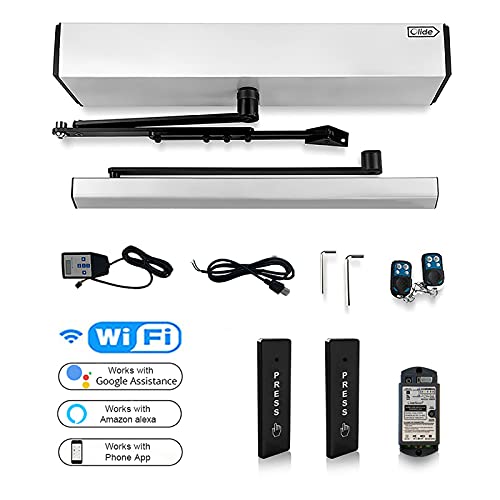
Best for tech-enabled spaces seeking app control and voice integration. This model offers a WiFi-connected door opener with an app interface and compatibility with Alexa and Google Assistant for voice commands. All major parameters, including manually applied push force and hold-open time, can be adjusted via the handheld programmer. It includes a safety feature that reopens if an obstacle is detected. Limitation: WiFi reliability can affect remote operation if the network is unstable.
Handicap Door Opener With 2PCS Remote Controllers

Best for users needing flexible opening methods and remote control within a long range. It supports manual and automatic modes, offers password or ID card access for additional security, and includes multiple activation methods such as wireless remotes and access controllers. A potential limitation is setup complexity for first-time installers due to multiple activation options. Use this when ADA access and credential-based entry are priority.
Buying Guide
What matters most when choosing an accessible automatic door opener?
- Door type and mounting: Ensure compatibility with your door swing and frame. Most options here are for single or dual swing doors.
- Power and energy use: Look for low-energy modes if you need long-term efficiency or battery backup considerations.
- Safety features: Auto-reopen on obstruction and anti-pinch protections reduce injury risk for all users.
- Control options: Decide between manual push, wireless remotes, touchless sensors, or smart home integration (WiFi, Alexa, Google Assistant).
- Programming and maintenance: Consider how easily parameters like hold-open time and closing force can be adjusted.
- Accessibility methods: Favor systems offering multiple activation modes (button, card/ID, motion, remote) for diverse users.
- Security: If credential-based access is required, ensure robust authentication options are available and compatible with your space’s policies.
FAQ
- What is an ADA-compliant automatic door opener?
Answer: It is a door opener designed to meet accessibility standards, enabling easier access for wheelchair users and others with limited mobility while providing safe operation and controllable activation methods. - Can these openers operate without internet or WiFi?
Answer: Yes, many models support manual push or wired/wireless push buttons as a primary activation method, with optional WiFi features for smart control. - Do automatic door openers pose pinch risks?
Answer: Most units include anti-pinch safety features and auto-reopen if an obstacle is detected in the closing path. - What installation considerations matter?
Answer: Check door weight rating, hinge type, clearance, and whether the system supports a single or dual door setup; professional installation is often recommended. - Are remote controls necessary for accessibility?
Answer: Remote controls improve convenience for caregivers and users, but optional in many models if the door is easily reachable from the point of entry. - Can I integrate these with voice assistants?
Answer: Several models offer compatibility with Alexa and Google Assistant for voice control, along with app-based operation.