Discover reliable adapters that bridge legacy A/V gear with modern displays. This guide highlights five top picks that convert composite or YPbPr/component signals to HDMI or compatible formats, helping you enjoy DVDs, game consoles, and older players on today’s screens. Each option emphasizes ease of use, compatibility, and solid video/audio performance for American home entertainment setups.
| Product | Brand | Signal Type | Output | Key Benefit |
|---|---|---|---|---|
| HDSUNWSTD Component to AV Adapter | HDSUNWSTD | YPbPr to AV | RCA | One-way conversion, NTSC setting guidance |
| ABLEWE RCA to HDMI Converter | ABLEWE | RCA (composite) to HDMI | HDMI | Plug-and-play, broad PAL/NTSC compatibility |
| Portta Component to HDMI Converter | Portta | YPbPr to HDMI | HDMI | Supports 1080p, LPCM audio, HDCP compatibility |
| Anber-Tech YPbPr to HDMI Converter | Anber-Tech | YPbPr to HDMI | HDMI | HDMI 1.4, HDCP 1.4, keeps native resolutions |
| NEWCARE Component to HDMI Converter | NEWCARE | YPbPr to HDMI | HDMI | Supports up to 1080p, uncompressed audio, aluminum body |
HDSUNWSTD Component To AV Adapter

This one-way converter changes YPbPr/component signals into a standard AV/RCA output, suitable for older TVs with composite video and stereo audio inputs. It’s designed for NTSC use in the USA and supports uncompressed HD audio formats, including DTS Digital and Dolby Digital, when available. The device is intended for source material that originates in YPbPr and is not a reverse-flow adapter. It’s ideal for connecting legacy DVD players or set-top devices to a present-day display that only accepts RCA inputs.
ABLEWE RCA To HDMI Converter

The ABLEWE model converts analog RCA composite signals (Yellow, White, Red) into HDMI with 720P/1080P output. It’s a plug-and-play solution that requires USB power for operation and supports a range of classic color standards (PAL/NTSC variations). This option is well-suited for restoring playback from older VHS, DVD players, or game consoles on modern HDTVs or computer displays, without needing a computer or drivers.
Portta Component To HDMI Converter

Portta’s adapter converts analog YPbPr component and R/L audio signals to HDMI. It supports 1080p60 and HDCP 1.2/1.3, with multiple resolution options from 480i up to 1080p. The device emphasizes uncompressed LPCM audio and aims to deliver stable signal transmission with minimal delay. Note that it does not support reverse conversion (HDMI to component) and is best used with devices that provide a YPbPr output.
Tengchi RCA To HDMI Converter

This RCA-to-HDMI adapter converts composite inputs to HDMI 1080p output. It’s simple plug-and-play with a USB power requirement and supports standard 1080p displays. It notes limitations like no 3D or 4K output and emphasizes easy setup for older PS2/PS3, VCRs, or other devices that rely on RCA connections. It’s a practical choice for basic conversion needs with minimal setup.
Anber-Tech YPbPr To HDMI Converter
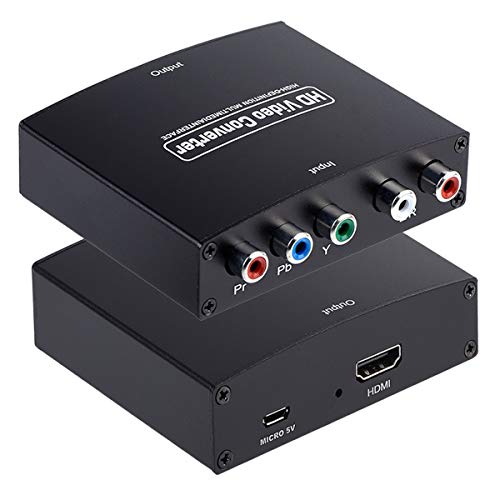
The Anber-Tech component-to-HDMI adapter converts analog YPbPr video and R/L audio into HDMI, enabling older DVD players or consoles to connect to HDMI displays. It clearly states that this is a one-way conversion and emphasizes compatibility with devices that provide YPbPr output rather than RCA. Supported component resolutions range up to 1080p, and it includes HDCP 1.4 compliance for broader device compatibility.
NEWCARE Component To HDMI Converter

The NEWCARE adapter focuses on one-way conversion from YPbPr/component to HDMI. It supports 1080P output and provides uncompressed audio options such as DTS Digital and Dolby Digital, along with PCM stereo. The aluminum alloy construction adds durability, and it includes a USB power requirement for operation. It’s positioned as a reliable solution for upgrading older players to modern displays while preserving video quality.
Buying Guide
- Input and output compatibility: Confirm whether the device handles YPbPr/component, RCA/composite, or both, and ensure HDMI output matches your display’s capabilities (720p/1080p, HDCP support).
- One-way vs. two-way: Most adapters in this category are one-way (signal from analog to HDMI). Do not expect reverse conversion unless specified.
- Audio support: Look for uncompressed LPCM or basic surround formats. Some models advertise DTS/Dolby Digital passthrough as part of the input stream.
- Power requirements: Several units require USB power. Ensure you have a spare USB port or appropriate power adapter available near the setup.
- HDCP and copy protection: If you’re routing to a modern TV or monitor, HDCP compatibility helps ensure a smooth signal and avoids black screens.
- Resolution and upscaling: Most adapters do not upscale; they preserve source resolution up to 1080p. If you need upscaling, verify that feature is supported.
- Build quality and durability: Aluminum or robust housings tend to offer better longevity, especially for frequent connections.
- Ease of use: Plug-and-play designs with clear labeling streamline setup for non-technical users.
When choosing among these options, consider your existing devices, the compatibility of their outputs, and how you plan to use the setup—for example, a single old DVD player connected to a modern TV, or a game console that relies on component outputs. Each model above provides a practical path to enjoy legacy media on contemporary displays without replacing your entire AV library.