Discover the best desks with RGB lighting to elevate gaming setups and productive workspaces. This guide highlights five top options, explaining who each is best for and why. Each choice balances integrated lighting, storage, and build quality to suit different room sizes and user needs. Perfect for gamers seeking immersive ambiance, remote workers needing organized space, and streamers aiming for a polished backdrop.
- Best overall for expansive setups: AODK 59 Inch Gaming Desk
- Best for corner spaces: ODK 53 Inch L Shaped Gaming Desk
- Best budget-friendly large desk: HLDIRECT 47 Inch Gaming Desk
- Best modular storage with lighting: Korfile 47 Inch Gaming Desk
- Best space-saving option with power: Korfile 40 Inch Gaming Desk
Product Overview
| Product | Brand | Key Benefit |
|---|---|---|
| AODK 59 Inch Gaming Desk with LED Light | AODK | Eye-level chassis with immersive RGB under-monitor shelf |
| ODK 53 Inch L Shaped Gaming Desk with LED | ODK | Built-in outlets and flexible layout for multitasking |
| HLDIRECT 47 Inch Gaming Desk with LED Lights | HLDIRECT | Balanced size with robust build and cable management |
| Korfile 47 Inch Gaming Desk with Power Outlets | Korfile | Five fabric drawers and full monitor stand |
| Korfile 40 Inch Gaming Desk with LED Lights | Korfile | Compact L-shaped option with power and storage |
AODK 59 Inch Gaming Desk With LED Light

The AODK desk is designed for panoramic PC builds, elevating the chassis to eye level with an integrated elevated desktop stand. It includes an immersive RGB lighting strip under the monitor shelf to sync with internal PC lighting, creating a seamless glow from case to desk. It features three fabric drawers to hide cables and accessories, helping maintain a clean surface. Best for gamers who want a showpiece rig and minimal clutter around the desktop.
Best for: Large, display-focused setups that prioritize visibility of the PC internals and a streamer-ready vibe. Avoid this if you need a compact footprint or non-symmetric storage.
ODK 53 Inch L Shaped Gaming Desk With LED Lighting

This L-shaped desk offers built-in storage including dual shelves, CPU stand, a tool bag, and a USB charging setup with 3 AC outlets and 2 USB ports. The RGB lighting supports numerous presets and memory functions, making it flexible for various room styles. Its layout is well-suited for multitasking, mini home offices, or gaming corners that require easy access to peripherals.
Best for: Corner setups where desks must double as a compact workstation. Choose this if you need strong cable management and integrated power access. Caution: the footprint is larger, so measure your space first.
HLDIRECT 47 Inch Gaming Desk With LED Lights
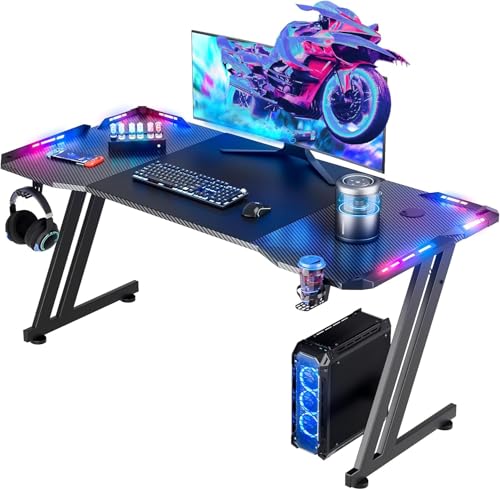
This 47-inch desk balances size and stability, with room for two monitors and a cable management system to reduce clutter. The carbon-fiber-inspired surface offers a premium feel, while the RGB lighting provides immersive ambient effects. It’s a good pick for mid-sized rooms and multi-monitor setups.
Best for: Gamers and remote workers who want a sturdy, mid-sized desk with clean lines. Limitation: weight handling and expansion may be less than larger models.
Korfile 47 Inch Gaming Desk With Power Outlets

This desk features 5 fabric storage drawers and a full MOS monitor stand, plus RGB lighting with 22 customizable effects. It includes 3 AC outlets and 2 USB ports, making it a practical choice for busy desks with many devices. The reversible design allows flexible installation to fit different rooms.
Best for: Users who need abundant storage and a high monitor setup. Choose this if you value integrated charging and a reversible layout. Limitation: heavier drawers may require careful placement to avoid tipping when loaded.
Korfile 40 Inch Gaming Desk With LED Lights

This compact L-shaped desk is designed for smaller spaces, featuring RGB LED lighting, a monitor stand, a USB charging hub, and a reversible layout. The carbon fiber texture adds a modern, premium look while maintaining a smaller footprint. Best for: Dorm rooms or tight corners where space efficiency matters. Caution: the smaller surface may limit large multi-monitor setups.
Buying Guide: Key Purchase Considerations
What desk size fits my space?
Measure room length, width, and ceiling height. If you have a dedicated gaming corner, an L-shaped or corner desk can maximize the usable area without crowding the room. For small spaces, a 33–47 inch desk with integrated storage can reduce clutter.
How important is RGB lighting quality?
Look for desks with multiple color presets, brightness levels, and power options that suit your devices. Some desks include APP control and music-synced modes for dynamic atmosphere, which can enhance gameplay and streaming aesthetics.
What storage and cable management do I need?
Five or more fabric drawers, built-in shelves, and dedicated cable channels help keep peripherals organized. A monitor stand or CPU shelf can free up desk surface and improve airflow around components.
Do I need power outlets built into the desk?
Integrated outlets reduce the need for wall adapters and can simplify cable routing. If you have many devices (PC, monitor, speakers, consoles), prioritize desks with USB ports and multiple AC outlets.
Is a reversible design a benefit?
A reversible L-shaped desk offers flexibility for room layouts. It helps you adapt to left- or right-side corners and changing furniture arrangements without purchasing a new desk.
Material and durability considerations
Look for MDF or engineered wood with a scratch-resistant surface. Carbon fiber textures and robust frames improve longevity and ease of cleaning, especially in active gaming environments.
What about assembly and warranty?
Many desks come with straightforward assembly instructions and essential hardware. Check for included mounting hardware, weight limits, and whether the brand provides a warranty or customer support for parts replacement.
Frequently Asked Questions
- Are desks with LED lighting worth it for gaming? Yes, they create an immersive ambiance and can reduce eye strain by providing ambient backlight that complements screen brightness.
- Can these desks hold multiple monitors? Most listed desks support dual-monitor setups, but always verify weight limits and monitor stand compatibility before purchase.
- Do these desks require special power sources? Most use standard wall outlets; some models include USB ports and multiple outlets on the desk to reduce clutter.
- Is a corner desk better for small rooms? Yes, corner and L-shaped designs maximize corner real estate and keep the main desktop surface free for peripherals.
- What storage options help with cable management? Drawers, shelves, and built-in cable channels help hide power strips and adapters, improving airflow and cleanliness.
- How do I choose between a large vs. compact desk? Consider your space, number of devices, and whether you need room for peripherals or a large desk mat for gaming.