Answer: For reliable keyless access, choose a smart lock that supports fobs, cards, codes, or fingerprint entry and works with your door type. This guide highlights five top options ideal for homes, apartments, or small offices. Whether you want quick fingerprint entry, remote app control, or multiple access methods, these locks are selected for ease of use, reliability, and setup clarity. The top picks are best for busy households, rental properties, or tech-savvy users who want flexible access management.
Buyer’s quick comparison table
| Product | Best For | Unlock Methods | Note |
|---|---|---|---|
| Evanshow Fingerprint Door Lock | Front doors, homes, offices | Fingerprint, Password, Cards, Keys | Fast 0.5s fingerprint; admin setup required |
| Colosus Electronic Keyless Door Lock | Low-maintenance security | PIN, RFID, Remote, Keys | Multiple entry modes with local support |
| Veise VE017 Satin Nickel | Multi-tenant or family homes | Fingerprint, App, Card, Code, Key, Voice (with gateway) | On-device AI fingerprint recognition |
| Yamiry Smart Door Handle with 6-in-1 | Rekey-friendly renovations | Fingerprint, Bluetooth App, Passcode, Key Fob, Mechanical Key, Alexa | Easy DIY installation |
| KUCACCI Keypad Smart Door Lock | Front doors, upgrades | Fingerprint, PIN, App, Key Fob, Mechanical Key | Reversible handle, quick screwdriver install |
Evanshow Fingerprint Door Lock Biometric Door Knob

Features: 4-in-1 smart lock with fingerprint, password, 2 mechanical keys, and 4 IC cards. Supports up to 100 fingerprints and 50 passwords. 0.5-second fingerprint recognition. Admin fingerprint must be registered before use. USB emergency power port available; cannot charge internal batteries.
Best for: Households needing quick, reliable fingerprint access with multiple backup methods. Better for front doors or offices where guests may need temporary access. Caution: The initial admin setup is essential to prevent unintended unlocks; ensure administrator fingerprint is registered at setup.
Colosus Electronic Keyless Door Lock
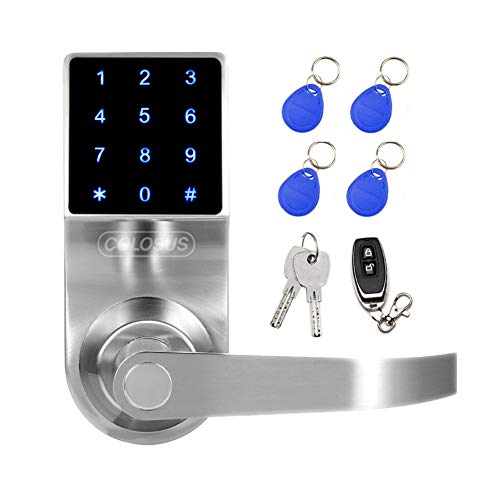
Features: Keyless entry with four access modes: PIN code, RFID card, remote control, and mechanical key. Designed for homes, offices, or small businesses. English-speaking US customer support available for installation, programming, and troubleshooting.
Best for: Environments where multiple credential types are needed and user support is valued. Choose this if you prefer straightforward keyless access without relying solely on biometrics. Limitation: No AI fingerprint described, so primary access is PIN/card/remote and key.
Veise VE017 Fingerprint Smart Door Lock Satin Nickel

Features: 8-in-1 unlocking: fingerprint, app, authorized access, RFID card, code, code sharing, voice via Alexa/Google Assistant (gateway required), and mechanical key. AI-powered self-learning fingerprint recognition with on-device chip; unlocks in under 0.2 seconds with 99.99% accuracy. Activity logs track every entry. Includes auto-lock and multiple control options via app and voice assistants.
Best for: Homes or multi-user properties needing flexible, remote access and detailed activity tracking. Better for users who want AI-enhanced fingerprint accuracy and future-proof integration with voice assistants. Caution: Requires a gateway for voice assistant features and remote access beyond local control.
Yamiry Smart Door Handle With 6-In-1 Entry

Features: 6 unlocking methods including fingerprint, Bluetooth app control, personalized passcodes, key fobs, mechanical keys, and Alexa voice unlock with remote control (gateway required). Quick DIY installation suitable for most standard American doors. App enables access management, temporary codes, and unlock history.
Best for: Homeowners upgrading to a versatile keypad lock with extensive access options and easy installation. Choose this if you want seamless app control and occasional voice-assisted unlocking. Limitation: Some features require a separately sold gateway for remote and voice integrations.
KUCACCI Keypad Smart Door Lock With Handle

Features: Easy DIY installation with a screwdriver in about 10 minutes. Supports fingerprint, pin code, smartphone app, key fob, and mechanical key. Reversible handle fits both left- and right-handed doors. Wi-Fi gateway optional for remote unlock and Alexa integration.
Best for: Upgrading traditional exterior doors with a compact, versatile keypad solution. Choose this if you want straightforward installation and multiple access methods without a heavy hardware footprint. Limitation: Some smart features require a gateway for remote or voice-enabled control.
Buying Guide: Key Purchase Considerations
- Access methods: Decide which combination of fingerprint, PIN/code, cards/fobs, remote/app, or mechanical keys best fits your household.
- Installation and door compatibility: Check whether your door type (exterior wood/metal, thickness) matches the lock’s installation requirements and whether the handle is reversible.
- Power and backup options: Look for a USB emergency power port or battery backup and understand how to power the lock if batteries fail.
- Security and privacy: Consider AI-assisted fingerprint systems, activity logs, and permissions management for tracking who enters and when.
- Smart home integration: If you use voice assistants, verify gateway requirements and whether the lock supports Alexa or Google Assistant via a gateway.
- User management: Ensure the lock supports multiple users, temporary access codes, and easy addition/removal of fingerprints or cards.
- Support and reliability: Opt for brands offering clear installation guidance and responsive US-based support if issues arise.
FAQ
- What is the best door lock for families with many visitors?
Answer: Locks offering multiple access methods (fingerprint, codes, cards) and robust admin controls are ideal, such as 8-in-1 or 6-in-1 models with activity logs. - Do all smart locks require a Wi-Fi gateway for remote control?
Answer: Not all do; some work locally via Bluetooth or a direct app connection. A gateway is often needed for remote or voice-enabled features. - Are biometrics necessary for keyless entry?
Answer: No; many locks provide PINs, cards, fobs, or mechanical keys as alternatives to biometric options. - Can these locks fit retrofit installations on existing doors?
Answer: Most listed models target standard American doors and offer DIY installations in under 15 minutes, but verify screw patterns and backset compatibility. - What should I do if the lock battery dies?
Answer: Use the USB emergency power port or a backup mechanical key if provided by the lock model. - Do these locks log entry activity?
Answer: Many models offer detailed activity logs to show who accessed the property and when, improving security visibility.