Looking for a solid garage door opener deal? This guide highlights five reliable remote and opener accessories that work across major brands like LiftMaster, Chamberlain, and Craftsman. It’s ideal for households with multiple cars, frequent remote replacements, or upgrades to smarter control. Each pick is explained with who it’s best for, why it stands out, and a practical caveat. A quick product table follows to help you compare at a glance.
| Product | Best For | Key Benefit |
|---|---|---|
| ZONIQ 2-Pack Garage Door Opener Remote | Multi-car households | Broad compatibility and 120-ft range |
| Genie Chain Drive 550 | DIY installers | Easy installation and rail design |
| Chamberlain Belt Drive MyQ Opener with Camera | Smart-home users | Battery backup and built-in camera |
| 2 for Chamberlain/LiftMaster Universal Remotes | Extra remotes | Wide compatibility, 3 frequencies |
| 2X for LiftMaster/Craftsman Universal Remote | Cost-effective backups | Extensive compatibility, simple programming |
ZONIQ 2-Pack Remote for Universal Garage Openers

Best for households with multiple vehicles or where remotes frequently get misplaced. ZONIQ offers broad compatibility with LiftMaster, Chamberlain, and Craftsman openers from 1993 to present. It supports Security+ 2.0 and older frequencies, making it a versatile replacement. The 120-foot range provides extended reach for easier entry from the driveway. The setup is designed to be quick and user-friendly, avoiding complicated programming steps.
Who it’s for: families with several cars or shared garage access who want one remote that covers most existing openers. Why chosen: wide compatibility reduces the need to juggle multiple remotes. Caution: verify the learn button color on your opener to confirm full compatibility, especially on models with unique frequency configurations.
Genie Chain Drive 550 Garage Door Opener

Better for DIY installers seeking straightforward installation. The Genie Chain Drive 550 uses a heavy-duty chain drive and a 5-piece rail system that snaps together with minimal hardware. It ships with a pre-assembled chain, which means fewer steps during setup. It also works with popular built-in car systems like Home Link and Car2U, reducing the need for extra hardware.
Who it’s for: homeowners who want a reliable, easy-to-install unit with solid compatibility for common car remotes. Why chosen: the no-hardware-required rail assembly improves installation speed. Caution: this model is a chain-drive system, which tends to be noisier than belt drives in living spaces above garages.
Chamberlain Belt Drive myQ Garage Door Opener with Camera

Best for smart-home enthusiasts who want continuous connectivity and added safety. This Chamberlain setup features a belt-drive, ultra-quiet operation, and built-in camera for visual monitoring. The myQ app enables remote control from a smartphone, and the system includes battery backup for power outages. The camera and LED lighting add practical value for early-evening or nighttime use.
Who it’s for: users seeking seamless smart-home integration, remote monitoring, and backup power. Why chosen: combines quiet operation with a camera and reliable mobile access. Caution: as a belt-drive with camera, it may come with a higher price point and installation complexity compared to basic remotes.
2 for LiftMaster Chamberlain Craftsman Universal Remotes
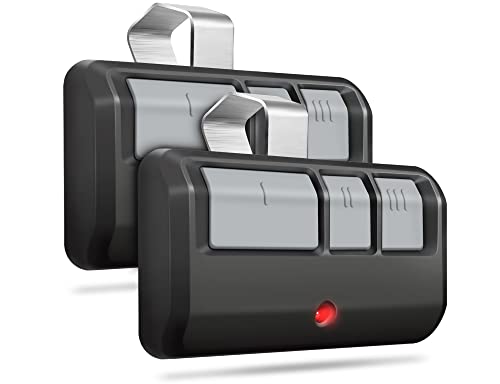
Best for adding extra remotes in a multi-car family. These universal remotes cover LiftMaster, Chamberlain, and Craftsman models manufactured from 1993 to present. They support three different frequencies of security rolling codes, making them a flexible backup or replacement option. The remote uses Security+ 2.0 and older codes for broad compatibility and reduced interference.
Who it’s for: households needing additional remotes that pair with multiple openers. Why chosen: wide compatibility across eras and models. Caution: not compatible with MyQ-only systems, and verify your opener’s learn button colors before ordering to ensure proper pairing.
MyQ Smart Garage Door Video Keypad with Camera
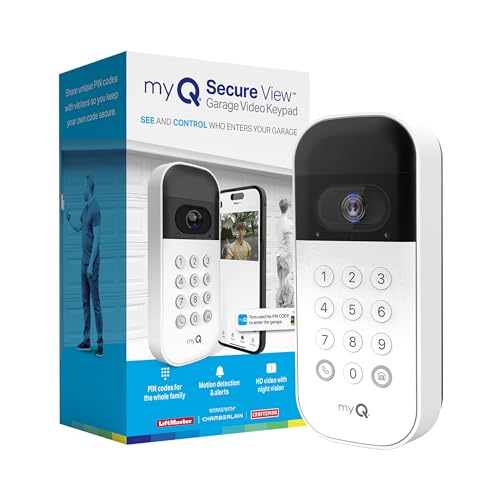
Best for controlled access and mobile alerts. This keypad provides wide-angle camera coverage and customizable PIN codes, paired with smartphone control via myQ. It’s compatible with Chamberlain, LiftMaster, and Craftsman openers, adding convenience for shared access without handing out remotes. Real-time notifications help monitor activity and maintain security.
Who it’s for: households needing a keypad entry option with added video monitoring. Why chosen: strengthens access control and remote visibility. Caution: the keypad’s benefits are maximized when used with compatible myQ-enabled systems; ensure your opener supports full integration.
1-Remote Replacement for Chamberlain/Craftsman/LiftMaster (893LM, 893Max, 891LM, 971LM, 371LM, 373LM)
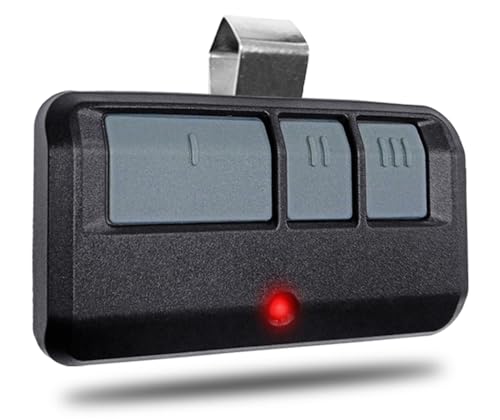
Best for a cost-effective backup option. This remote covers many popular models from 1993 to present, with compatibility across multiple button frequencies. It emphasizes Security Rolling Code technology for reduced interference. It provides a three-button layout for controlling multiple openers or functions within range.
Who it’s for: buyers seeking a budget-friendly backup remote that still covers broad compatibility. Why chosen: cost-effective, simple DIY programming. Caution: not compatible with DIP switch systems or certain non-MyQ Genie models; confirm your opener’s compatibility before purchasing.
2X for LiftMaster Chamberlain Craftsman Universal Remotes

Best for households needing extra unit redundancy and wide opener compatibility. These remotes replace multiple models including 893LM, 893Max, 971LM, and 973LM among others. They support yellow, purple, red/orange, or green Learn Buttons and offer quick DIY pairing. They are not compatible with MyQ-only setups and require color-verified pairing.
Who it’s for: multi-vehicle families seeking reliable backups and straightforward setup. Why chosen: extensive compatibility with older and newer models. Caution: verify Learn Button color on your opener to ensure proper pairing; not suitable for some modern MyQ-only configurations.
Buying Guide: Key Considerations for Garage Door Opener Deals
Which remote or opener feature should guide your choice? Consider compatibility, range, installation effort, and smart-home integration. For multi-car households, prioritize broad compatibility and extra remotes. If quiet operation matters, belt-drive systems paired with smart controls may be best. For security-minded buyers, look for rolling code technology and HomeKit/HomeKit-like ecosystem support.
- Compatibility: Confirm Learn Button color and frequency support (Security+ 2.0, 315/390 MHz, etc.). For MyQ-enabled setups, verify full integration.
- Installation: DIY-friendly remotes with simple programming save time and avoid service calls. Rail and belt-drive systems offer different noise profiles.
- Range: A longer remote range (e.g., up to 120 feet) can improve convenience, especially if you park farther from the door.
- Smart features: Battery backup, built-in cameras, and smartphone apps add value in a connected home. Ensure your router and app ecosystem support the device.
- Security: Look for rolling code technology that updates codes with every use to reduce interference and prevent unauthorized access.
Quick buyer questions
- Do universal remotes work with my exact model? Check Learn Button color and supported frequencies in the product description.
- Is a belt-drive or chain-drive opener quieter for an attached garage? Belt drives are generally quieter; chain drives are more durable for heavier doors.
- Can I control my garage remotely with a smartphone? If the opener is MyQ-enabled, you can via the corresponding app, subject to device compatibility.
- Do I need a backup battery? Battery backup ensures access during power outages for select models.
- Will adding a keypad improve security? A keypad with unique PINs adds controlled access without distributing remotes.
Frequently Asked Questions
- What remote works with most Chamberlain openers? Many Chamberlain models use Security+ 2.0 remotes; confirm the Learn Button color on your unit.
- Are universal remotes compatible with older models? Yes, many universal remotes cover models from 1993 to present, but verify frequencies.
- Can I install a remote myself? Most remotes offer DIY programming; follow the included steps for quick setup.
- Do I need to replace multiple remotes at once? If you have several cars, consider a 2-pack or 2X pack to ensure all vehicles have access.
- Will a keypad or video camera require additional hardware? Some cameras require monitor compatibility; verify the device works with your opener and app.