The following in-wall iPad mounts are designed to hold a range of tablets securely while keeping cables hidden and access simple. From anti-theft kiosks to kitchen-friendly under-cabinet setups, these options cover residential and commercial needs. Each pick supports common iPad sizes and other major tablets, with varying degrees of tilt, swivel, and lock features to match different environments.
| Product | Brand | Notable Feature |
|---|---|---|
| Magnetic iPad Wall Mount | NINEFATICS | Strong magnets and wide compatibility for 4.7″-13″ devices |
| VidaMount White On-Wall Mount (iPad Pro 11″, Air 10.9″) | VidaMount | Enclosure-only, flush-to-wall design for simple installation |
| Mount-It! Universal Tablet Wall Mount | Mount-It! | Anti-theft enclosure with 9.7″-13″ tablet support |
| VidaMount White On-Wall Mount (iPad 10.9″ & 11″) | VidaMount | Enclosure-only, quick access with snap-in cover |
| AboveTEK Universal Tablet Wall Mount | AboveTEK | Anti-theft security, 360° rotation, suitable for 9.7″-13″ tablets |
Magnetic iPad Wall Mount By NINEFATICS
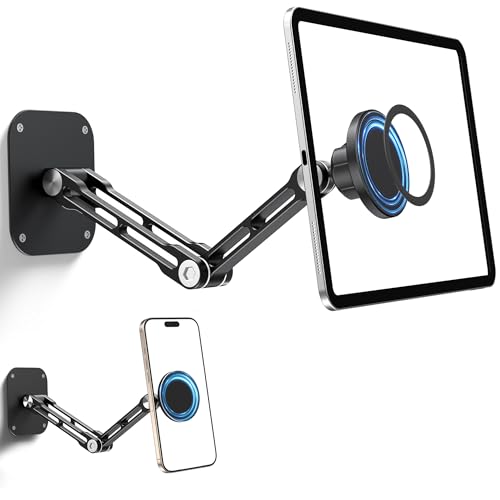
The NINEFATICS Magnetic iPad Wall Mount uses a sturdy aluminum alloy frame with high-strength magnets to stabilize devices in high-traffic or heavy-use settings. It supports 4.7″ to 13″ screens, including iPad Pro, iPad Air, iPad Mini, and many Galaxy tablets. The design is optimized for durability, making it a practical choice for kitchens, offices, and retail kiosks.
Important setup notes include using the included metal ring for non-MagSafe devices and ensuring the surface is clean and grease-free for best magnetic performance. For the strongest hold, allow 24 hours after attaching the metal ring before mounting the device. This model is adaptable to both tablets and larger phones, broadening its use in mixed-device environments.
VidaMount White On-Wall Mount For iPad Pro and iPad Air

VidaMount’s white on-wall enclosure is designed for a clean, flush look with iPad Pro 11″ (1st–4th Gen), iPad Air 10.9″ (4th–5th Gen) and iPad Air 11″ (M2–M3). The product listing emphasizes that the enclosure is the only component included; the tablet is not included, and installation is straightforward on any wall surface. The design emphasizes quick removal via snap-in access so staff or users can swap devices rapidly.
Ideal for installations where security and simple maintenance are priorities. The flush-wall approach minimizes protrusion, helping to keep workflows tidy in offices, classrooms, and clinics. Its simplicity makes it a practical add-on for environments that rotate tablets or require fast replacements without tools.
Mount-It! Universal Tablet Wall Mount

The Mount-It! solution offers a universal enclosure designed for tablets from 9.7″ to 13″ and up to 30 lbs. It targets business environments requiring anti-theft protection and kiosk-style deployment. The sturdy steel construction provides long-term durability, and the low-profile flush mounting is suitable for vertical or horizontal orientations. The design supports access for maintenance and updates while deterring tampering in public spaces.
Practical for hospitality, libraries, and retail where a secure, visible tablet display is essential. It accommodates latest iPad generations and other major tablets, making it a flexible option for mixed-device ecosystems. The anti-theft design is a strong consideration for shared devices and high-traffic venues.
VidaMount White On-Wall Mount For iPad 10.9″ & 11″

This VidaMount model focuses on enclosure-only mounting with compatibility for iPad 10.9″ (10th Gen) and iPad 11″ (A16). Like other VidaMount offerings, the unit is designed to mount flush to the wall, offering a sleek aesthetic with easy installation on standard walls. The key feature is straightforward access via a snap-in removable cover, enabling quick tablet swaps without removing the entire enclosure.
Designed for environments that require a clean, minimal footprint and quick device changes — such as classrooms, clinics, or studios. The emphasis on flush installation helps keep sightlines clear and reduces the risk of accidental bumps or snagging on protruding devices.
AboveTEK Universal Tablet Wall Mount

AboveTEK’s universal anti-theft wall mount targets high-traffic environments such as retail, lobbies, and events. It supports screens from 9.7″ to 13″ and offers a robust locking mechanism (tamper-proof screws and wrench included). The unit supports 360° rotation and a tilt range of -30° to +30°, allowing both portrait and landscape orientations with minimal glare. A sturdy, commercial-grade aluminum build helps ensure durability in busy settings.
Its universal compatibility covers iPads and Galaxy Tabs, making it a versatile choice for organizations that deploy various devices. The design emphasizes security features and an engaging user experience, enabling interactive displays while protecting hardware from tampering.
Buying Guide: Key Considerations For Choosing An In-Wall iPad Mount
- Device compatibility: Confirm the mount supports your tablet’s size (diagonal measure) and thickness. Some enclosures are only suitable for 9.7″ to 13″ tablets, while others are compatible with a broader range including 4.7″ to 13″.
- Security features: If the device will be in public or high-traffic areas, evaluate anti-theft options like locking enclosures, tamper-proof screws, or keyless locking mechanisms.
- Installation style: Enclosures that mount flush to the wall offer a tidy look but may require precise mounting. Some models are enclosure-only, while others include the tablet as part of the kit or rely on snap-in covers for quick changes.
- Accessibility and usability: Look for adjustable viewing angles (360° swivel, tilt ranges) to reduce glare and improve ergonomics for users in kitchens, classrooms, or retail spaces.
- Material and durability: Aluminum alloy frames and steel enclosures provide durability for busy environments. Heavier builds are more resistant to wobble when tapped or bumped.
- Maintenance and updates: Consider whether the tablet is easily swapped or replaced without tools, and whether any included rings or adapters require a break-in period for magnetic compatibility.
- Cable management: A flush-mount design often helps minimize visible cables. Check whether the kit includes sufficient cable routing options to keep an organized look.
- Compatibility with accessories: Some mounts offer extra features like cameras, or adapters to support future devices, so consider whether future-proofing is important for your space.
Choosing the right in-wall mount involves balancing security, ease of use, and the environmental context. For high-traffic public spaces, prioritize anti-theft features and durable construction. For home kitchens or study areas, a flexible tilt and swivel plus quick-access enclosures may be more important. Always verify device dimensions and wall compatibility before purchase, and plan for cable routing to maintain a clean installation.