Looking for a smart lock with a lever or handleset that blends convenience, security, and style? This guide highlights five top options that integrate handle sets with keyless entry, WiFi, fingerprint, or keypad access. Each pick suits different households—from busy families to those who want hands-free entry. Read on to compare features, unlock methods, and ideal buyers.
| Product | Best For | Unlock Methods | Connectivity |
|---|---|---|---|
| Philips WiFi Keypad Door Lock with Handle | Households needing remote control | Keypad, fingerprint, app, voice | Built-in WiFi |
| Philips Touchscreen WiFi Smart Lock with Handle Set | Busy families seeking fast fingerprint unlock | Fingerprint, app, codes | Built-in WiFi |
| Veise VE027-H Built-in Wi-Fi Fingerprint Smart Deadbolt Lock | Homes prioritizing flexible access | Fingerprint, app, codes, voice | Built-in WiFi |
| Philips Smart Lock with Handles | Families upgrading existing hardware | Fingerprint, PIN, keys, app | Bluetooth + optional WiFi via gateway |
| Philips WiFi Smart Door Lock with Handle | Those who want remote control without hubs | Voice, app, keys, passcodes | Built-in WiFi |
Philips WiFi Keypad Door Lock with Handle

Best for remote access with multiple unlock options. This model connects directly to 2.4GHz WiFi without a hub, letting you control the lock from anywhere via the Philips Home Access App. It supports remote locking/unlocking, user code and fingerprint management, and real-time status checks. Voice control with Alexa or Google Assistant adds hands-free convenience for busy days.
Who it’s for: households that want direct WiFi connectivity and robust access management from a single app. Best for remote workers or families with varying schedules.
Caution: Requires a stable 2.4GHz WiFi connection; dual-band networks may occasionally complicate setup.
Philips Touchscreen WiFi Smart Lock with Handle Set

Best for quick fingerprint entry and real-time activity records. This model includes built-in WiFi for direct remote control, plus real-time alerts and detailed access history in the app. Fingerprint unlock is designed for speed and accuracy, helping families breeze through doorways while maintaining security.
Who it’s for: households that want a quick fingerprint unlock and clear access logs. Good for families with members who frequently enter and leave together.
Caution: Requires ongoing battery maintenance; replace batteries promptly after a low battery alert to avoid lockouts.
Veise VE027-H Built-in Wi-Fi Fingerprint Smart Deadbolt Lock
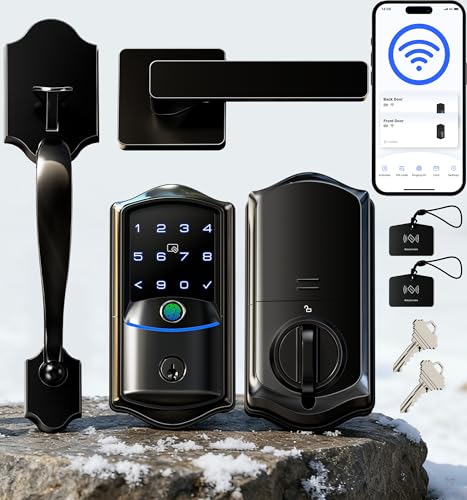
Best for flexible access options with robust remote features. Veise VE027-H combines built-in WiFi, fingerprint scanning, keypad, and remote app control. It supports voice control via Alexa or Google Assistant and offers guest access sharing, history logs, and remote code management for households with frequent visitors or service workers.
Who it’s for: owners who want multiple unlocking methods plus guest-code management. Suitable for rentals or multi-tenant homes.
Caution: Data emphasizes broad compatibility with major WiFi networks; ensure network security when enabling remote access.
Philips Smart Lock with Handles
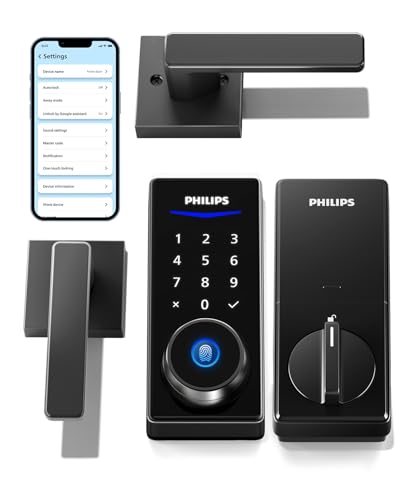
Best for seamless integration with a complete handle set upgrade. This lock includes two lever handles and offers four unlock methods: fingerprint, PIN codes, keys, and the mobile app. Bluetooth enables local access, while a future gateway can unlock remote control via WiFi. It’s a practical upgrade for existing doors that need a modern, secure, keyless option.
Who it’s for: households upgrading door hardware and wanting flexible, multiple unlock methods. Choose this if you want a complete handle set with smart capabilities.
Caution: Bluetooth range is typically limited; remote control depends on gateway availability if you expand to WiFi later.
Philips WiFi Smart Door Lock with Handle

Best for voice-assisted, hub-free smart entry. This lock connects directly to 2.4GHz WiFi and integrates with the Philips Home Access App for remote control, access permissions, and real-time notifications. It supports voice unlock through Alexa or Google Assistant and offers multiple password modes for scheduling or sharing access.
Who it’s for: users who want comprehensive remote management and voice-assisted entry without relying on a separate hub. Ideal for smart home enthusiasts seeking flexible access control.
Caution: Works best with stable 2.4GHz networks; ensure network security when enabling frequent remote sharing of access.
Buying Guide: Key Considerations When Choosing a Smart Lock With Handleset
- Locking and unlocking methods: Decide whether you prefer fingerprint, keypad, Bluetooth, voice control, or app-based access. Some models combine several options for flexibility.
- Connectivity: Choose built-in WiFi for direct remote control or Bluetooth with a hub or gateway for wider ecosystem integration. Consider whether you want standalone operation or smart-home compatibility.
- Real-time monitoring: Real-time alerts and access logs help you track who enters or leaves. Look for notifications, event history, and guest code management if you frequently host visitors or service people.
- Ease of installation: Levers or handlesets may require compatible door prep. Some models include the handle set, while others rely on existing hardware. Check size and backset compatibility.
- Battery life and power options: Battery-powered locks require periodic replacement. Some models provide long battery life or low-battery alerts. Ensure you have a plan for battery maintenance.
- Security features: Look for anti-tamper design, auto-lock timing, and secure data handling for codes and fingerprints. IP ratings indicate weather resistance for exterior doors.
- Voice assistant compatibility: If you use Alexa or Google Assistant, verify that the lock supports voice commands for locking, unlocking, or status checks.
- Privacy and data control: Consider how access data is stored and who can manage user permissions. Ensure your preferred devices can access the lock without unnecessary exposure.
Frequently Asked Questions
- What is a handleset smart lock?
A handleset smart lock combines a traditional door handle with integrated electronic locking and often a keypad, fingerprint reader, or app-based control for keyless entry. - Do these locks require a hub?
Some models work directly over built-in WiFi, while others need a gateway or hub for remote access or advanced features. Check the product notes for hub requirements. - Can I use voice commands to lock or unlock?
Many models support Alexa or Google Assistant for hands-free locking and status checks. Verify compatibility with your smart home ecosystem. - How do I share access with guests or service providers?
Most locks offer guest codes, temporary codes, or remote access sharing via a companion app. This is useful for tenants, house sitters, and cleaners. - Is a fingerprint lock more secure than PIN codes?
Fingerprint readers provide quick access and can enhance security, but it’s wise to combine biometric access with codes or app control to avoid single points of failure. - What maintenance is required?
Regular battery checks and timely replacements are essential. Some locks provide low-battery alerts to prevent lockouts.