Maximize desk space and improve ergonomics with wall-mounted monitor arms designed for a range of screens. This guide highlights five top options that balance full motion, VESA compatibility, and sturdy construction for American workspaces. Each entry includes core features to help you compare at a glance and choose the right setup for your home office, gaming station, or professional workstation.
| Product | Brand | Key Benefit |
|---|---|---|
| MOUNT PRO Single Monitor Wall Mount | MOUNT PRO | Full motion with broad compatibility |
| UPGRAVITY Dual Monitor Wall Mount | UPGRAVITY | Double displays with ergonomic height |
| Mount-It! Sit Stand Wall Mount MI-7905 | Mount-It! | Sit-stand workstation and keyboard tray |
| WALI Computer Monitor Wall Mount GSWM001 | WALI | Strong gas spring with wide compatibility |
| monTEK Dual Monitor Wall Mount | monTEK | Dual displays with full motion and sturdy build |
MOUNT PRO Single Monitor Wall Mount

The MOUNT PRO wall mount supports 13–32 inch screens with VESA 75×75 or 100×100 patterns and a weight load up to 17.6 lbs. It offers full motion with +90° to -90° tilt, 180° swivel, and 360° rotation. The arm extends up to 20.4 inches for precise positioning and comfortable viewing angles, reducing neck strain during long work sessions. Integrated cable management helps keep cords tidy and out of sight, contributing to a clean workspace.
UPGRAVITY Dual Monitor Wall Mount

The UPGRAVITY dual mount fits most 17–32 inch screens up to 17.6 lbs per display with VESA 75x75mm and 100x100mm patterns. It enables up to 11.02 inches of height adjustment and supports tilt, swivel, and rotation for ergonomic viewing. The design emphasizes cable management to reduce desk clutter and maintain a tidy setup while freeing up workspace for other peripherals.
Mount-It! Sit Stand Wall Mount MI-7905
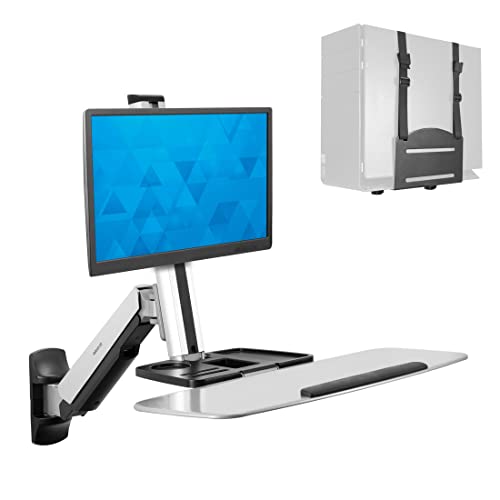
Mount-It! combines a wall-mounted stand with a sit-stand workstation concept. The system extends up to 41 inches from the wall and includes a keyboard tray and CPU holder for a full setup. It features a gas spring-assisted height adjustment and supports a monitor tilt up to 15 degrees, 180-degree swivel, and 360-degree rotation, enabling flexible transitions between standing and seated work while maintaining a compact footprint.
WALI Computer Monitor Wall Mount GSWM001

WALI’s single monitor arm supports up to 32 inches and 22 lbs, with a gas spring for smooth motion. It accommodates VESA 75x75mm or 100x100mm and offers tilt from +70° to -45°, plus +/-90° swivel and 360° rotation for portrait or landscape viewing. The design emphasizes stability and ease of positioning, making it suitable for home offices and multi-use spaces where walls are the primary mounting surface.
monTEK Dual Monitor Wall Mount

monTEK’s dual-arm wall mount fits 17–32 inch screens with VESA 75x75mm or 100x100mm patterns and supports up to 19.8 lbs per display. It delivers full motion with +90° to -90° tilt, 180° swivel, and 360° rotation, plus a compact retraction near the wall. The arms extend for flexible positioning and reduce desk clutter, making it a solid option for multitasking setups and compact workspaces.
Buying Guide
- Screen size and weight: Confirm each arm supports your monitor’s size and weight. Heavier or larger monitors benefit from heavier-duty arms with robust mounting hardware.
- VESA compatibility: Check for VESA patterns 75x75mm or 100x100mm. Some models also support larger patterns; verify compatibility before purchasing.
- Motion range: Consider tilt, swivel, and rotation capabilities. If you switch between portrait and landscape or need precise tilt for ergonomics, prioritize full-motion models.
- Mount type and wall compatibility: Ensure your wall type (brick, concrete, or wood stud) is compatible with the mount’s installation method and weight rating.
- Desk space and reach: A wall mount should free desk space while offering sufficient extension. Measure wall clearance and check maximum reach and wall-to-screen distance.
- Cable management: Look for integrated channels to hide cables for a clean setup and reduced cable wear over time.
- Ergonomics: Choose height-adjustable arms or gas-spring systems that enable easy positioning to reduce neck and shoulder strain during long sessions.
- Dual monitor setups: For multi-monitor configurations, ensure the mount supports two arms with synchronized range of motion and reliable stability.
- Assembly and maintenance: Consider tools required, installation time, and whether the mount provides quick-release or adjustable mounting plates for future changes.
- Budget vs. features: Higher-priced models often offer smoother motion, stronger construction, and better cable management. Balance cost with your ergonomic goals.