Answering the need for organized, accessible printing setups, this guide highlights top wall mounted printer stands and shelves. The selections are best suited for small spaces, busy offices, cafes, and kitchen or workflow areas where counter clutter matters. Each option is evaluated for space savings, load capacity, and installation practicality, so you can choose the right fit for your printer, devices, and workflow.
| Product | Best For | Key Benefit |
|---|---|---|
| Hicarer Wall Mounted Pos Printer Shelf 7″ x 10″ x 5.5″ | Compact spaces | Space-saving wall mount for small printers |
| Hicarer 8″ x 6″ x 5″ Wall Mounted Printer Shelf | Tight work areas | Slim profile with solid steel construction |
| Glownary Wall Mounted Stainless Steel Printer Shelf | Industrial use | 50 lb capacity and integrated cable management |
| Mount-It! Printer Pole Mount for Thermal Label Printers | Flexible positioning | Full motion arm with tilt/rotation |
| Hicarer Wall Mounted Stainless Steel Kitchen Printer Shelf | Kitchen or busy prep areas | Large surface area and durable stainless steel |
SRIWATANA Floating Shelves Set Of 2
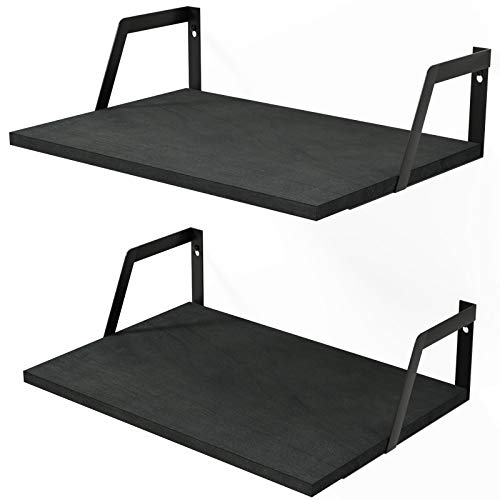
Best for: Small spaces needing general storage with a decorative touch. These black floating shelves provide wall-mounted storage that can hold small printers accessories, papers, or decor. The included industrial brackets support a modern look while clearing counter space. Caution: Not designed specifically for heavy printers; ensure your printer weight and mounted load stay within the stated capacity of the brackets and wall anchors.
Hicarer Wall Mounted Pos Printer Shelf 7″ x 10″ x 5.5″
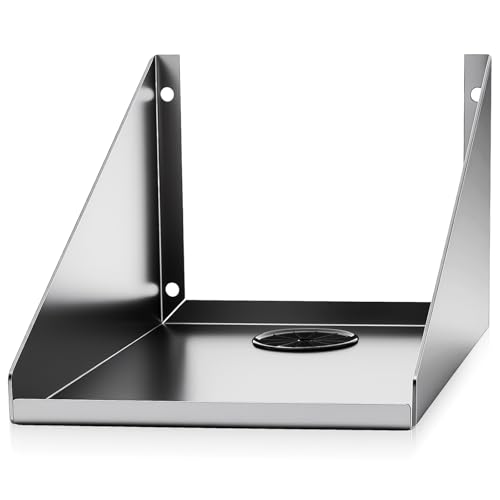
Best for: Small to mid-size POS receipt printers in cafes, retail counters, or desks. Why chosen: Compact dimensions fit tight spaces, while 304 stainless steel construction resists corrosion and heat. The wall mount design frees countertop space and the reinforced base adds stability. Limitation: Some printers may require extra depth or z-height clearance beyond the 5.5-inch thickness for cables and connectors.
Hicarer 8″ x 6″ x 5″ Wall Mounted Shelf
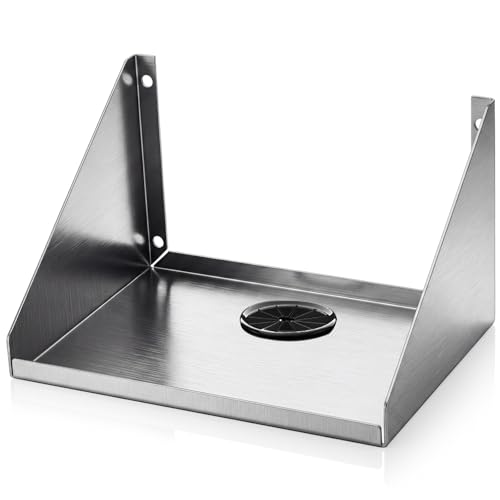
Best for: Tight checkout counters, small bars, or compact offices. Why chosen: Slim footprint and 304 stainless steel offer durability and corrosion resistance, with a reinforced bend design for load stability. Caution: Suitable for lighter printers or devices; test balance for heavier equipment to avoid tipping or bending under load.
Glownary Wall Mounted Stainless Steel Printer Shelf

Best for: Commercial or industrial environments needing higher load capacity and organized cabling. Why chosen: 50 lb capacity with a built-in cable hole for neat routing. The 16-gauge Type 430 stainless steel ensures durability. Caution: Wall anchors and studs must be capable of supporting higher loads; verify wall type before installation.
Mount-It! Printer Pole Mount

Best for: Dynamic workstations needing flexible printer positioning. Why chosen: A full motion arm and tilt/rotate features provide precise viewing angles and ergonomic access. It supports popular thermal printers up to 11 lbs. Caution: Requires sturdy pole mounting or compatible mounting surface; verify ceiling or wall mounting supports your chosen setup.
Hicarer Wall Mounted Kitchen Printer Shelf

Best for: Busy kitchens or dining prep areas where a kitchen printer or receipt printer is needed near service lines. Why chosen: Large 14″ x 10″ surface supports bigger tickets printers and heavy-duty units; stainless steel resists heat and corrosion. Caution: Ensure wall clearance behind the shelf for cable routing and ventilation during continuous operation.
Buying Guide
Key considerations when choosing a wall mounted printer stand:
- Printer size and weight: Verify the shelf’s depth, height clearance, and weight rating align with your printer model and future upgrades.
- Wall type and mounting: Drywall may require toggles or studs; concrete walls may need anchors. Ensure mounting hardware is rated for the load and wall material.
- Material and finish: Stainless steel resists corrosion and cleaning in kitchens or bathrooms; decorative shelves suit living areas but may limit load.
- Cable management: Built-in holes or channels keep cords organized and reduce clutter near printing areas.
- Accessibility and ergonomics: Adjustable arms or tilt features improve viewing angles and reduce neck strain during use.
- Space optimization: Consider how the unit affects workflow—do you gain countertop space or simply relocate clutter?
Frequently Asked Questions
- What should I measure before buying a wall mounted printer shelf?
Measure printer dimensions (width, depth, height), cord clearance, and the wall space available to ensure a proper fit. - Are wall mounted shelves suitable for heavy printers?
They can be, if the shelf has a high load rating and is correctly anchored to studs or solid backing. Check the rated capacity and installation requirements. - Is cable management important for printer shelves?
Yes. Built-in cable holes or channels help reduce clutter and prevent tangling, which improves maintenance and safety. - Can these mounts support multi-printer setups?
Some models offer wider shelves or multiple tiers. For two printers, choose a larger surface or a dual-shelf arrangement with proper load distribution. - What is the advantage of a pole-mounted printer mount?
It offers dynamic positioning, easy angle adjustment, and can free up wall space, suitable for shared workstations or high-traffic areas. - Do these shelves require professional installation?
For heavy devices or complex mounts, professional installation is advisable to ensure safety and proper anchoring.